为什么叫原生IO,也就是后续有更加强大的NIO、AIO操作,但原生IO是基础,先学习一下!
IO流的概念
前面介绍JavaAPI的时候,只是对目录/文件进行操作,而具体的内容操作就需要IO流
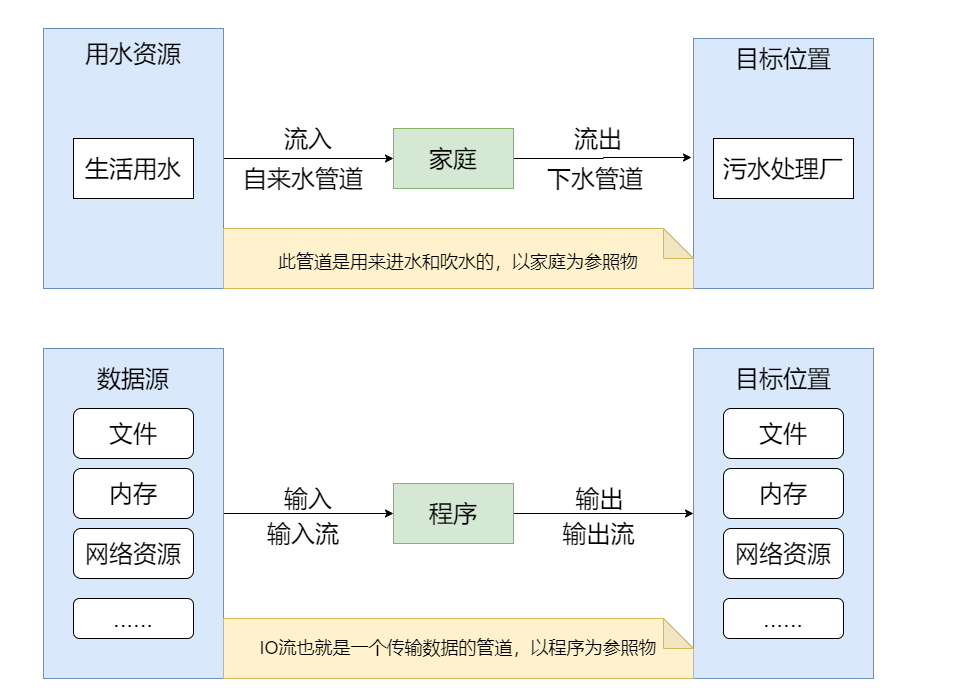
I/O的全称是Input/Output,顾名思义就是用来设备之间传输数据的
io的示意图
分类

io体系


乍一看分类太杂了,但是如果作为初学者不用全部掌握,掌握几个流的操作方法,其它的流操作也是大同小异!
基本使用步骤
之前在介绍JavaAPI的时候介绍过File类的含义,我们进行IO操作的时候,就是依靠这个File类,先去创建它的对象!
输入:
创建File类的对象,指定读取数据的来源
创建对应的输入流对象,将File类的对象作为参数
传输数据,创建相应的byte[] 或 char[]。
关闭流对象(占用系统资源)
输出:
创建File类的对象,指定读取数据的来源,文件不存在时会进行创建
创建对应的输入流对象,将File类的对象作为参数
传输数据,write(char[]/byte[] buffer,0,len)
关闭流对象(占用系统资源)
输入流
字节流
主要操作的是抽象类InputStream的子类,看InputStream的描述
/** * This abstract class is the superclass of all classes representing * an input stream of bytes. * * <p> Applications that need to define a subclass of <code>InputStream</code> * must always provide a method that returns the next byte of input. * * 此抽象类表示所有字节输入流类的超类 * InputStream的子类应用程序需要提供一个输入字节的方法。 */ public abstract class InputStream implements Closeable {//读取数据的方法public abstract int read() throws IOException; //一个一个字节进行读取,读到最后一个字节之后返回-1public int read(byte b[]) throws IOException{} //读取数组长度的字节public int read(byte b[], int off, int len) throws IOException{}public class TestFileInputsream { public static void main(String[] args) throws IOException { //1、创建源文件对象 File file = new File("F:\\test.txt"); //2、创建源文件到程序的输出流对象 InputStream inputStream = new FileInputStream(file); //3、读取源文件 int read = inputStream.read(); //一个一个字节进行读取,读到最后一个字节之后返回-1 while (read != -1) { System.out.print((char) read); read = inputStream.read(); } //4、关闭输出流对象 inputStream.close(); }}package com.ty.inputstream;import java.io.File;import java.io.FileInputStream;import java.io.IOException;import java.io.InputStream;public class TestFileInputsream2 { public static void main(String[] args) throws IOException { //1、创建源文件对象 File file = new File("F:\\test.txt"); //2、创建源文件到程序的输出流对象 InputStream inputStream = new FileInputStream(file); byte[] bytes = new byte[1024]; //利用缓冲数组,开辟1024个空间 //3、读取源文件,读取数组长度的字节 int read = inputStream.read(bytes); while (read != -1) { for (int i = 0; i < read; i++) { System.out.print((char) bytes[i]); } read = inputStream.read(); } //4、关闭输出流对象 inputStream.close(); }}System.in
前面在常用的API介绍过System是一个工具类,而System.in此时得到的其实是一个标准的输入流,而且是一个字节流
/** * The "standard" input stream. This stream is already * open and ready to supply input data. Typically this stream * corresponds to keyboard input or another input source specified by * the host environment or user. * * "标准"输入流。该流已经打开,可以提供输入数据了。通常,此流对应于键盘输入或主机环境和用户指定的另一个输入源。 */public final static InputStream in = null;public class TestSystemIn { public static void main(String[] args) throws IOException { /* * InputStream in = System.in; * int read = in.read();//read方法等待键盘的录入,是一个阻塞方法。 * System.out.println(read); */ /**从键盘录一个数据 * Scanner 扫描器,扫描键盘到程序的那个输入流 * 还可以扫描其他流,比如:Scanner sc=new Scanner(new FileInputStream(new File("F:\\test.txt"))); */ Scanner scanner = new Scanner(System.in); int num = scanner.nextInt(); System.out.println(num); Scanner sc=new Scanner(new FileInputStream(new File("F:\\test.txt"))); while (sc.hasNext()){ System.out.println(sc.next()); } }}字符流
主要操作的是抽象类Reader的子类,看Reader的描述
/** * Abstract class for reading character streams. The only methods that a * subclass must implement are read(char[], int, int) and close(). Most * subclasses, however, will override some of the methods defined here in order * to provide higher efficiency, additional functionality, or both. * * 读取字符流的抽象类。 子类必须实现的唯一方法是read(char [],int,int)和close()。 * 但是,大多数子类将覆盖此处定义的某些方法,以提供更高的效率和/或附加功能。 */ public abstract class Reader implements Readable, Closeable { //读取数据的方法 public int read() throws IOException{} public int read(char cbuf[]) throws IOException{} abstract public int read(char cbuf[], int off, int len) throws IOException;public class TestFileReader { public static void main(String[] args) throws IOException { //1、创建源文件对象 File file = new File("F:\\test.txt"); //2、创建源文件到程序的输出流对象 Reader reader = new FileReader(file); //3、读取源文件,一个一个字符进行读取 int read = reader.read(); while (read != -1) { System.out.print((char) read); read = reader.read(); } //4、关闭输出流对象 reader.close(); }}public class TestFileReader2 { public static void main(String[] args) throws IOException { //1、创建源文件对象 File file = new File("F:\\test.txt"); //2、创建源文件到程序的输出流对象 Reader reader = new FileReader(file); char[] chars=new char[1024]; //3、读取源文件,读取数组长度的字符 int read = reader.read(chars); while (read != -1) {// for (int i = 0; i < read; i++) {// System.out.print(chars[i]);// } System.out.print(new String(chars,0,read)); //将数组转为String read=reader.read(chars); } //4、关闭输出流对象 reader.close(); }}输出流
字节流
主要操作的是抽象类OutputStream的子类,看OutputStream的描述
/** * This abstract class is the superclass of all classes representing * an output stream of bytes. An output stream accepts output bytes * and sends them to some sink. * <p> * Applications that need to define a subclass of * <code>OutputStream</code> must always provide at least a method * that writes one byte of output. * * 此抽象类表示所有字节输出流类的超类。 * OutputStream的子类应用程序需要提供一种返回一个字节输出的方法。 */public abstract class OutputStream implements Closeable, Flushable { //输出数据的方法public abstract void write(int b) throws IOException;//把数据输出到文件中,一个一个字节输出字节public void write(byte b[]) throws IOException{} //输出字节长度的字节public void write(byte b[], int off, int len) throws IOException{} //输出字节长度的字节,从off开始长度为lenpublic class TestFileOutputStream { public static void main(String[] args) throws IOException { //1、创建目标文件 File file=new File("F:\\demo.txt"); //2、创建程序到目标文件的输出流,这种情况前面指定的目标文件时如果不存在则会进行创建 OutputStream outputStream=new FileOutputStream(file); //OutputStream outputStream=new FileOutputStream(file,true);默认会对文件进行覆盖,这样会对文件进行追加 String str="hello"; byte[] bytes = str.getBytes(); for (byte b : bytes) { //3、把数据输出到文件中 outputStream.write(b); } //4、关闭输出流 outputStream.close(); }}public class TestFileOutputStream2 { public static void main(String[] args) throws IOException { //1、创建目标文件 File file=new File("F:\\demo.txt"); //2、创建程序到目标文件的输出流,这种情况前面指定的目标文件时如果不存在则会进行创建 OutputStream outputStream=new FileOutputStream(file); String str="hello,world"; byte[] bytes = str.getBytes(); //3、把数据输出到文件中,以字节长度输出到文件 outputStream.write(bytes); //4、关闭输出流 outputStream.close(); }}System.out
此时返回的是一个输出流 、 打印流(PrintStream)
/** * The "standard" output stream. This stream is already * open and ready to accept output data. Typically this stream * corresponds to display output or another output destination * specified by the host environment or user. * <p> * For simple stand-alone Java applications, a typical way to write * a line of output data is: * <blockquote><pre> * System.out.println(data) * </pre></blockquote> * <p> * See the <code>println</code> methods in class <code>PrintStream</code>. * * "标准"输出流。 该流已经打开,并准备接受输出数据。通常,此流对应于主机环境或用户指定的显示输出或另一个输出目标。 * 对于简单的独立Java应用程序,写一行输出数据的典型方法是:System.out.println(data) * 请参见类PrintStream的print方法。 */ public final static PrintStream out = null;public class TestSystemOut { public static void main(String[] args) { PrintStream out = System.out; out.println("hello"); // System.out.println("hello"),输出之后换行 out.print("hello,world"); // System.out.print("hello,world"),直接输出 }}字符流
主要操作的是抽象类Writer的子类,看Writer的描述
/** * Abstract class for writing to character streams. The only methods that a * subclass must implement are write(char[], int, int), flush(), and close(). * Most subclasses, however, will override some of the methods defined here in * order to provide higher efficiency, additional functionality, or both. * * 写入字符流的抽象类,子类必须实现的唯一方法是write(char [],int,int),flush()和close()。 * 但是,大多数子类将覆盖此处定义的某些方法,以提供更高的效率和/或附加功能。 */public abstract class Writer implements Appendable, Closeable, Flushable { //输出数据的方法 public void write(int c) throws IOException{}public void write(char cbuf[]) throws IOException{}abstract public void write(char cbuf[], int off, int len) throws IOException;public void write(String str) throws IOException{}public class TestFileWriter { public static void main(String[] args) throws IOException { //创建程序到目标文件的输出流,创建目标文件, Writer writer=new FileWriter(new File("F:\\demo.txt")); String str="夜曲"; for (int i = 0; i < str.length(); i++) { //把数据输出到文件中 writer.write(str.charAt(i)); } writer.write(str,0,str.length()); writer.write("我的梦!"); //关闭输出流 writer.close(); }}public class TestFileWriter2 { public static void main(String[] args) throws IOException { Writer writer=new FileWriter(new File("F:\\demo.txt")); String str="夜曲"; char[] chars=str.toCharArray(); writer.write(chars); writer.close(); }}复制文本
public class CopyText { public static void main(String[] args) throws IOException { Reader reader = new FileReader(new File("F:\\a.txt")); Writer writer = new FileWriter(new File("F:\\b.txt")); char[] chars = new char[1024]; int read = reader.read(chars); while (read != -1) { writer.write(chars, 0, read); read = reader.read(chars); } //关闭流的流程:先用后关 writer.close(); reader.close(); }}处理流
处理流就是在普通流也就是节点流的基础再嵌套一个流!
缓冲流
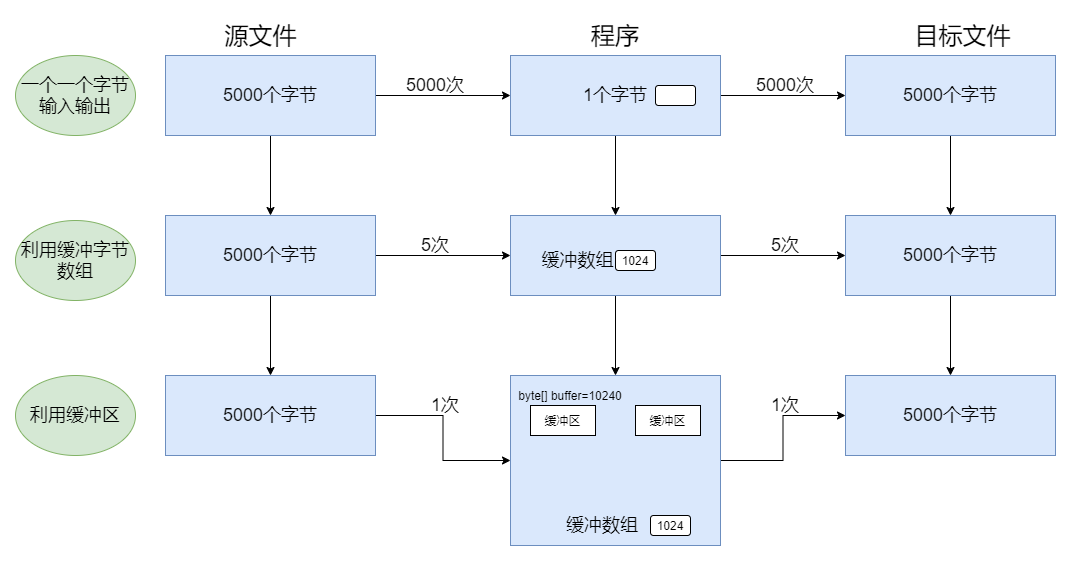
缓冲区(Buffered):BufferedOutputStream/BufferInputStream;字符:BufferedReader/BufferedWriter
提高IO效率,减少访问磁盘的次数
数据存储在缓冲区中,flush是将缓存区的内容写入文件中,也可以直接close
public class TestInputStream { public static void main(String[] args) throws IOException { File file = new File("F:\\test.txt"); InputStream inputStream = new FileInputStream(file); //在FileInputStream的基础上套用一个BufferedInputStream BufferedInputStream bufferedInputStream = new BufferedInputStream(inputStream); byte[] bytes = new byte[1024 * 10]; int read = bufferedInputStream.read(bytes); while (read != -1) { for (int i = 0; i < read; i++) { System.out.println((char) bytes[i]); } read = bufferedInputStream.read(bytes); } bufferedInputStream.close(); }}复制图片
public class CopyPicture { public static void main(String[] args) throws IOException { InputStream inputStream = new FileInputStream(new File("F:\\test.jpg")); OutputStream outputStream = new FileOutputStream(new File("F:\\copy.jpg")); BufferedInputStream bufferedInputStream = new BufferedInputStream(inputStream); BufferedOutputStream bufferedOutputStream = new BufferedOutputStream(outputStream); byte[] chars = new byte[1024 * 10]; int read = bufferedInputStream.read(chars); while (read != -1) { bufferedOutputStream.write(chars, 0, read); bufferedOutputStream.flush(); read = bufferedInputStream.read(chars); } bufferedOutputStream.close(); bufferedInputStream.close(); }}复制文件夹
public class CopyDir { public static void main(String[] args) { //copyFile(new File("F:/a.txt"), new File("F:/b.txt")); copyDir(new File("F:/a"), new File("F:/b")); } //复制文件夹 public static void copyDir(File srcFile, File targetFile) { if (!targetFile.exists()) { targetFile.mkdirs(); } File[] files = srcFile.listFiles(); for (File file : files) { if (file.isDirectory()) { copyDir(new File(srcFile + File.separator + file.getName()), new File(targetFile + File.separator + file.getName()) ); } if (file.isFile()) { copyFile(new File(srcFile + File.separator + file.getName()), new File(targetFile + File.separator + file.getName())); } } } //复制文件 public static void copyFile(File srcFile, File targetFile) { BufferedInputStream inputStream = null; BufferedOutputStream outputStream = null; try { inputStream = new BufferedInputStream(new FileInputStream(srcFile)); outputStream = new BufferedOutputStream(new FileOutputStream(targetFile)); byte[] bytes = new byte[1024 * 8]; int read = inputStream.read(bytes); while (read != -1) { outputStream.write(bytes, 0, read); read = inputStream.read(bytes); } } catch (FileNotFoundException e) { e.printStackTrace(); } catch (IOException e) { e.printStackTrace(); } finally { try { outputStream.close(); } catch (IOException e) { e.printStackTrace(); } try { inputStream.close(); } catch (IOException e) { e.printStackTrace(); } } }}通常我们进行io操作,异常不会向上抛,只会处理异常,但上面代码处理异常看的有些累赘!用上之前在异常章节说得try-resource写法
public class CopyDir { public static void main(String[] args) { copyDir(new File("F:/a"), new File("F:/b")); } //复制文件夹 public static void copyDir(File srcFile, File targetFile) { if (!targetFile.exists()) { targetFile.mkdirs(); } File[] files = srcFile.listFiles(); for (File file : files) { if (file.isDirectory()) { copyDir(new File(srcFile + File.separator + file.getName()), new File(targetFile + File.separator + file.getName()) ); } if (file.isFile()) { copyFile(new File(srcFile + File.separator + file.getName()), new File(targetFile + File.separator + file.getName())); } } } //复制文件 public static void copyFile(File srcFile, File targetFile) { try (BufferedInputStream inputStream = new BufferedInputStream(new FileInputStream(srcFile)); BufferedOutputStream outputStream = new BufferedOutputStream(new FileOutputStream(targetFile));) { byte[] bytes = new byte[1024 * 8]; int read = inputStream.read(bytes); while (read != -1) { outputStream.write(bytes, 0, read); read = inputStream.read(bytes); } } catch (IOException e) { e.printStackTrace(); } }}关闭io代码都不用我们处理了,其实是底层帮我们处理的,看反编译之后的class
public class CopyDir{ public static void main(String[] args) { copyDir(new File("F:/c"), new File("F:/d")); } public static void copyDir(File srcFile, File targetFile) { if (!targetFile.exists()) { targetFile.mkdirs(); } File[] files = srcFile.listFiles(); for (File file : files) { if (file.isDirectory()) { copyDir(new File(srcFile + File.separator + file.getName()), new File(targetFile + File.separator + file.getName())); } if (file.isFile()) copyFile(new File(srcFile + File.separator + file.getName()), new File(targetFile + File.separator + file.getName())); } } public static void copyFile(File srcFile, File targetFile) { try { BufferedInputStream inputStream = new BufferedInputStream(new FileInputStream(srcFile)); Throwable localThrowable6 = null; try { BufferedOutputStream outputStream = new BufferedOutputStream(new FileOutputStream(targetFile)); Throwable localThrowable7 = null; try { byte[] bytes = new byte[8192]; int read = inputStream.read(bytes); while (read != -1) { outputStream.write(bytes, 0, read); read = inputStream.read(bytes); } } catch (Throwable localThrowable1) { localThrowable7 = localThrowable1; throw localThrowable1; } finally { if (outputStream != null) if (localThrowable7 != null) try { outputStream.close(); } catch (Throwable localThrowable2) { localThrowable7.addSuppressed(localThrowable2); } else outputStream.close(); } } catch (Throwable localThrowable4) { localThrowable6 = localThrowable4; throw localThrowable4; } finally { if (inputStream != null) if (localThrowable6 != null) try { inputStream.close(); } catch (Throwable localThrowable5) { localThrowable6.addSuppressed(localThrowable5); } else inputStream.close(); } } catch (IOException e) { e.printStackTrace(); } }}转换流
主要操作的是InputStreamReader/OutputStreamWriter类
/** * An InputStreamReader is a bridge from byte streams to character streams: It * reads bytes and decodes them into characters using a specified {@link * java.nio.charset.Charset charset}. The charset that it uses * may be specified by name or may be given explicitly, or the platform's * default charset may be accepted. * * InputStreamReader是从字节流到字符流的桥梁:它读取字节,并使用指定的charset它们解码为charset 。 * 它使用的字符集可以通过名称指定,也可以显式指定,或者可以接受平台的默认字符集。 */public class InputStreamReader extends Reader {/** * An OutputStreamWriter is a bridge from character streams to byte streams: * Characters written to it are encoded into bytes using a specified {@link * java.nio.charset.Charset charset}. The charset that it uses * may be specified by name or may be given explicitly, or the platform's * default charset may be accepted. * * OutputStreamWriter是从字符流到字节流的桥梁:写入到字符流的字符使用指定的charset编码为字节。 * 它使用的字符集可以通过名称指定,也可以显式指定,或者可以接受平台的默认字符集。 */public class TestInputStreamReader { public static void main(String[] args) throws IOException { InputStream inputStream = new FileInputStream(new File("F:/test.txt")); /**需要指定一个编码格式,如果不指定则按照开发工具的编码格式进行转换 * 如果转换格式不统一就会乱码 */ InputStreamReader reader = new InputStreamReader(inputStream, "utf-8"); BufferedReader bufferedReader = new BufferedReader(reader); char[] chars = new char[1024 * 10]; int read = bufferedReader.read(chars); while (read != -1) { for (int i = 0; i < read; i++) { System.out.print(chars[i]); } read = bufferedReader.read(chars); } bufferedReader.close(); }}public class Copy { public static void main(String[] args) throws IOException { InputStreamReader reader=new InputStreamReader(new FileInputStream(new File("F:\\test.txt"))); OutputStreamWriter writer=new OutputStreamWriter(new FileOutputStream(new File("F:\\copy.txt"))); BufferedReader bufferedReader=new BufferedReader(reader); BufferedWriter bufferedWriter=new BufferedWriter(writer); char[] chars=new char[1024*10]; int read = bufferedReader.read(chars); while (read!=-1){ bufferedWriter.write(chars); read = bufferedReader.read(chars); } bufferedWriter.close(); bufferedReader.close(); }}键盘输入到文本
public class InputToText { public static void main(String[] args) throws IOException { InputStreamReader reader = new InputStreamReader(System.in); OutputStreamWriter writer = new OutputStreamWriter(new FileOutputStream(new File("F:\\text.txt"))); BufferedReader bufferedReader = new BufferedReader(reader); BufferedWriter bufferedWriter = new BufferedWriter(writer); String str = bufferedReader.readLine(); while (!"exit".equals(str)) { bufferedWriter.write(str); bufferedWriter.newLine(); str = bufferedReader.readLine(); } bufferedWriter.close(); bufferedReader.close(); }}数据流
用来操作基本数据类型和字符串的,主要操作DataInputStream和DataOutputStream类
/** * A data input stream lets an application read primitive Java data * types from an underlying input stream in a machine-independent * way. An application uses a data output stream to write data that * can later be read by a data input stream. * <p> * DataInputStream is not necessarily safe for multithreaded access. * Thread safety is optional and is the responsibility of users of * methods in this class. * * 数据输入流允许应用程序以与机器无关的方式从基础输入流中读取原始Java数据类型。 * 应用程序使用数据输出流来写入数据,以后可以由数据输入流读取。 * DataInputStream对于多线程访问不一定是安全的。线程安全是可选的,并且是此类中用户的责任 * DataInputStream:将文件中存储的基本数据类型和字符串写入内存的变量中 */public class DataInputStream extends FilterInputStream implements DataInput {/** * A data output stream lets an application write primitive Java data * types to an output stream in a portable way. An application can * then use a data input stream to read the data back in. * * 数据输出流允许应用程序以可移植的方式将原始Java数据类型写入输出流。然后,应用程序可以使用数据输入流来读回数据。 * DataOutputStream:将内存中的基本数据类型和字符串的变量写出到文件中 */public class DataOutputStream extends FilterOutputStream implements DataOutput {public class TestDataOutputStream { public static void main(String[] args) throws IOException { //路径不指定盘符是相对路径,指代当前项目工程下 DataOutputStream outputStream = new DataOutputStream(new FileOutputStream(new File("data.txt"))); outputStream.writeUTF("同一首歌!"); outputStream.write(66); outputStream.writeBoolean(true); outputStream.writeDouble(6.6); outputStream.close(); // 文件输出:同一首歌!B@ffffff,这个不是给你看的,是给程序看的 }}public class TestDataInputStream { public static void main(String[] args) throws IOException { DataInputStream inputStream = new DataInputStream(new FileInputStream(new File("data.txt"))); //写出的类型跟读入的类型一一匹配! System.out.println(inputStream.readUTF()); System.out.println(inputStream.read()); System.out.println(inputStream.readBoolean()); System.out.println(inputStream.readDouble()); inputStream.close(); }}对象流
可以把Java中的对象写入到数据源中,也能把对象从数据源中还原回来。主要操作ObjectInputStream和ObjectOutputStream类
/** * An ObjectInputStream deserializes primitive data and objects previously * written using an ObjectOutputStream. * * ObjectInputStream反序列化以前使用ObjectOutputStream编写的原始数据和对象。 */public class ObjectInputStream extends InputStream implements ObjectInput, ObjectStreamConstants{/** * An ObjectOutputStream writes primitive data types and graphs of Java objects * * ObjectOutputStream将Java的原始数据类型和对象类型写入OutputStream。 * 此操作也被称为序列化 */对象序列化的细节:
- 必须实现Serializable接口
- serialVersionUID的作用:序列化版本号,保证更改序列化类的结构时,不会对反序列化结果产生影响
- 必须保证其所有属性均可序列化
- 使用transient和static关键字修饰的属性,不会参与序列化
public class User implements Serializable { private static final long serialVersionUID = 7516451367496182472L; private String userName; private transient String password; private static double balance; private Integer number; public User() { } public User(String userName, String password, Integer number) { this.userName = userName; this.password = password; this.number = number; } public String getUserName() { return userName; } public void setUserName(String userName) { this.userName = userName; } public String getPassword() { return password; } public void setPassword(String password) { this.password = password; } public static double getBalance() { return balance; } public static void setBalance(double balance) { User.balance = balance; } public Integer getNumber() { return number; } public void setNumber(Integer number) { this.number = number; } @Override public String toString() { return "User{" + "userName=" + userName + ", password='" + password + '\'' + ", number=" + number + ", balance=" + balance + '}'; }}public class TestObjectOutputStream { public static void main(String[] args) throws IOException { ObjectOutputStream outputStream=new ObjectOutputStream(new FileOutputStream(new File("user.txt"))); User user=new User("jack","123456",17); User.setBalance(8500.0); System.out.println(user); outputStream.writeObject(user); outputStream.write(45); outputStream.writeBoolean(true); outputStream.close(); }}public class TestObjectInputStream { public static void main(String[] args) throws IOException, ClassNotFoundException { ObjectInputStream inputStream=new ObjectInputStream(new FileInputStream(new File("user.txt"))); System.out.println(inputStream.readObject()); System.out.println(inputStream.read()); System.out.println(inputStream.readBoolean()); inputStream.close(); }}编码格式
编码分类
| 字符编码 | 字符编码介绍 |
|---|---|
| ISO-8856-1 | 收录ASCII外,还包括西欧、希腊语、泰语、阿拉伯语、希伯来语对应的文字符号 |
| UTF-8 | 针对Unicode的可变长度字符编码,Windows系统中文默认为3个字节 |
| GB2312 | 简体中文 |
| GBK | 简体中文、扩充,Windows系统中文默认为2个字节 |
| BIG5 | 台湾,繁体中文 |
| 注意: | 当编码方式和解码方式不一致时,会出现乱码 |
编码和解码转换
public class TestEncoding { public static void main(String[] args) throws UnsupportedEncodingException { String str = "hello,欢迎"; //不传字符集时,默认按照IDE的编码 byte[] binary = str.getBytes("UTF-8"); //获得字符串的二进制表现形式:104 101 108 108 111 44 -26 -84 -94 -24 -65 -114 for (int i = 0; i < binary.length; i++) { System.out.print(binary[i] + "\t"); } String text=new String(binary,"gbk"); System.out.println(text); //hello,娆㈣繋 //错误做法 byte[] bytes = str.getBytes("gbk"); String s = new String(bytes, "utf-8"); System.out.println(s);//输出:hello,��ӭ 乱码那部分表示在UTF-8的编码中没有对应gbk的编码 //正确做法,编码和解码保持一致 bytes=str.getBytes("utf-8"); s = new String(bytes, "utf-8"); System.out.println(s); //输出:hello,欢迎 }}工具库:commons-io
原生的io操作比较复杂,有一个工具库可以简化我们的操作就是Common IO
参考地址 > <dependencies> <!-- https://mvnrepository.com/artifact/commons-io/commons-io --> <dependency> <groupId>commons-io</groupId> <artifactId>commons-io</artifactId> <version>2.8.0</version> </dependency> </dependencies>
public class TestCommon { public static void main(String[] args) throws IOException { long size = FileUtils.sizeOf(new File("F:\\c")); System.out.println("文件夹大小:" + size); FileUtils.copyFile(new File("F:\\a\\test.txt"),new File("F:\\a\\copy.txt")); FileUtils.write(new File("F:\\a\\test.txt"),"hello,Spring!"); }}ps:以上只是io体系的普通io,java有另一种io,即:NIO,是面向缓冲区的,所以会更高效。后续也是必学的!
原文转载:http://www.shaoqun.com/a/497299.html
myyearbook:https://www.ikjzd.com/w/726
三维度:https://www.ikjzd.com/w/1312
拍怕网:https://www.ikjzd.com/w/2205
为什么叫原生IO,也就是后续有更加强大的NIO、AIO操作,但原生IO是基础,先学习一下!IO流的概念前面介绍JavaAPI的时候,只是对目录/文件进行操作,而具体的内容操作就需要IO流I/O的全称是Input/Output,顾名思义就是用来设备之间传输数据的io的示意图分类io体系乍一看分类太杂了,但是如果作为初学者不用全部掌握,掌握几个流的操作方法,其它的流操作也是大同小异!基本使用步骤之前在
worldfirst:worldfirst
tenso:tenso
东南亚有什么好玩地方?:东南亚有什么好玩地方?
大阪城公园旅游攻略:大阪城公园旅游攻略
2020春节英德仙桥地下河有哪些玩的?仙桥地下河春节玩什么:2020春节英德仙桥地下河有哪些玩的?仙桥地下河春节玩什么

没有评论:
发表评论