koa2-MVC架构
---------后端技术做前端
环境:nodejs
开发工具:Visual Studio Code(下文简称:VSC)
环境安装,工具安装及中文自行百度 ,环境调整好后开始进入正题。
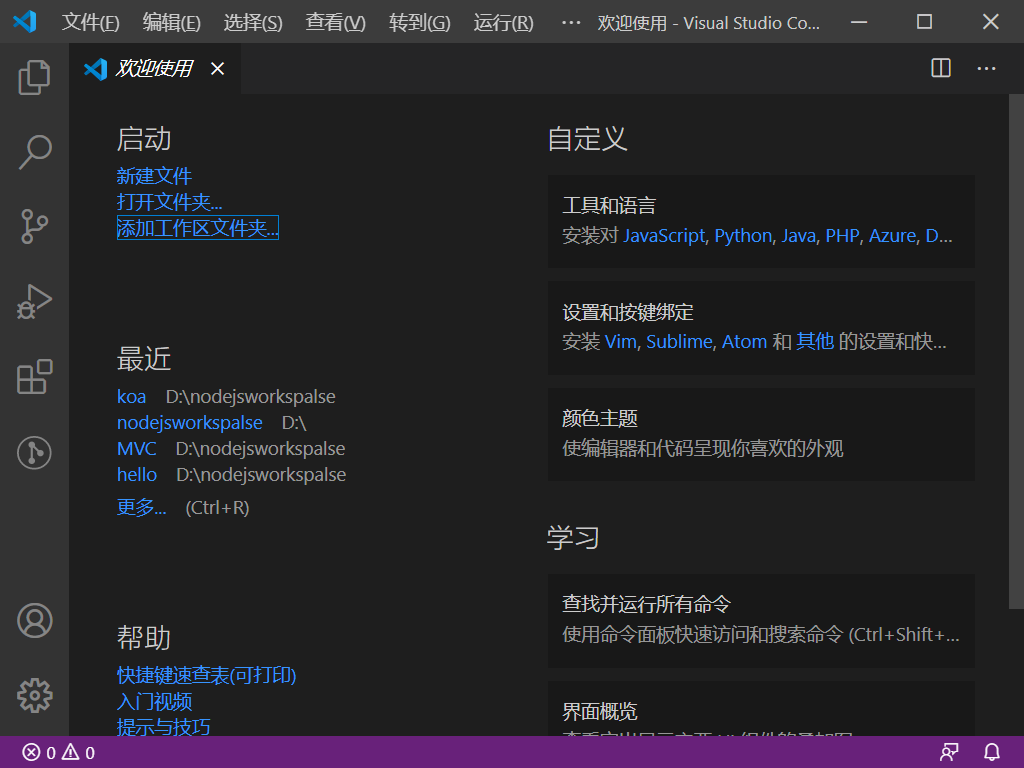
1、在硬盘上新增一个文件夹,打开VSC,点击'添加工作区文件夹',如果没有欢迎'使用页面',点击--文件--新建窗口,效果如下图:

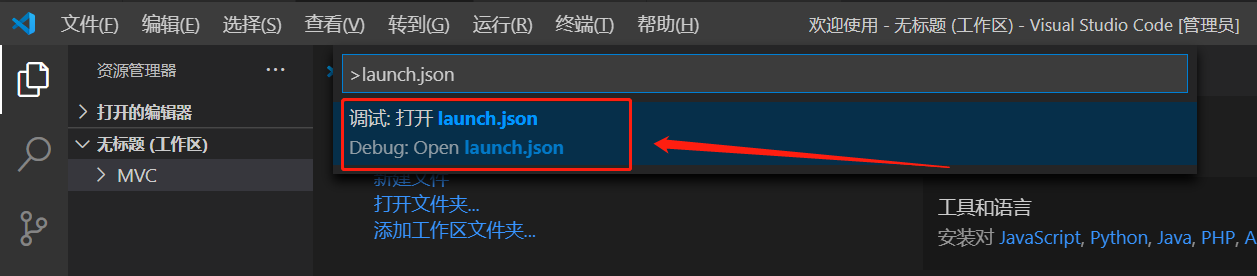
2、添加vsc调试。Shift+ctrl+p,输入框内输入:launch.json
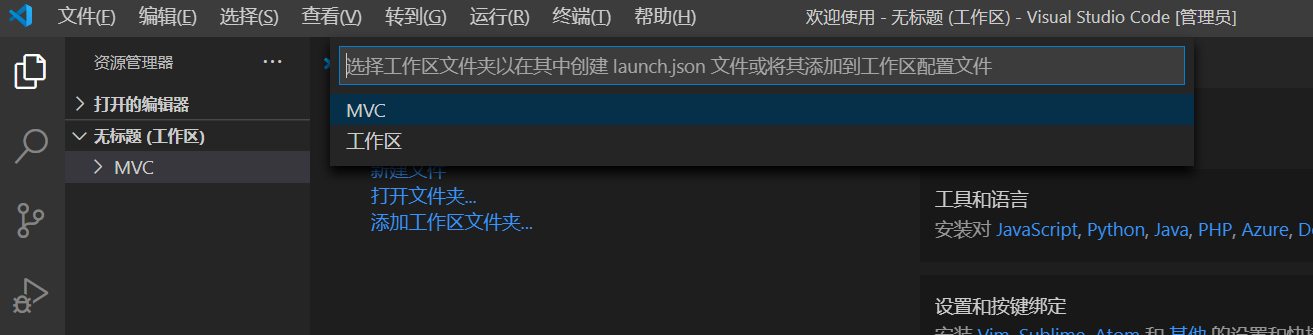
选择刚刚的文件夹
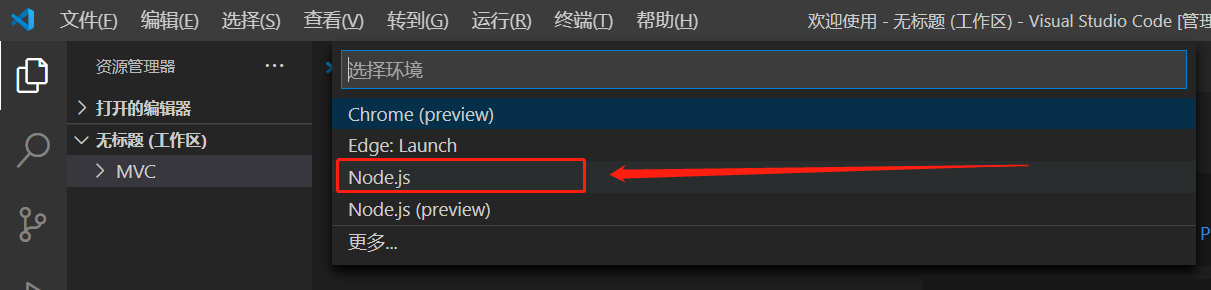
3、目录结构
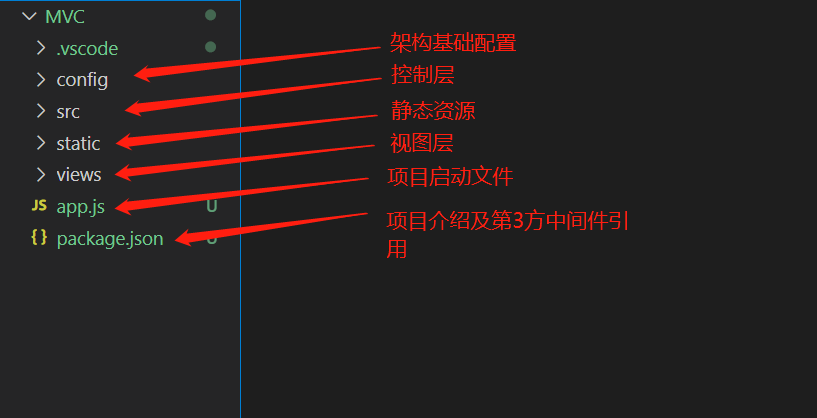
从低到高one by one
3-1、package.json
1 { 2 "name": "koa2mcv", 3 "version": "1.0.0", 4 "description": "Hello Koa 2 example with MVC", 5 "main": "app.js", 6 "scripts": { 7 "start": "node app.js" 8 }, 9 "author": "baba",10 "dependencies": {11 "koa": "2.11.0",12 "koa-router": "8.0.8",13 "koa-bodyparser": "4.3.0",14 "koa-static-plus": "0.1.1",15 "koa-view": "2.1.3",16 "koa-jwt": "4.0.0",17 "koa-log4": "2.3.2",18 "jsonwebtoken": "8.5.1",19 "nunjucks": "3.2.1",20 "mime": "2.4.5",21 "mz": "2.7.0"22 }23 }
参数介绍:name项目名称、version版本号、description项目描述、main项目启动文件、scripts启动快捷设置,author作者,dependencies第3方中间件名称及版本。
3-2、app.js
1 //启动服务2 require('./config/init').startServer();
启动相关配置,封装到config/init.js中,启动文件直接引用即可。
3-3、views存放html页面
3-4、static存放静态文件,css,js,font等
3-5、src存放业务控制,类似于springMVC中的controller、service。
3-6、config存放核心配置文件。
3-6-1、init.js项目核心。
异常友好处理 1 function handler(){ 2 return async (ctx, next) => { 3 4 const start = new Date().getTime(); 5 6 var urlReq=ctx.request.url; 7 if(urlReq !== '/favicon.ico'){ 8 9 console.log(`请求地址:${ctx.request.method} ${urlReq}`); 10 try {11 12 let params =Object.assign({}, ctx.request.query, ctx.request.body);13 14 if(config["token"].excludeUrl.indexOf(urlReq) == -1 && !tokenFunction.varifyToken(params.token)){15 ctx.status =401;16 }else{17 await next();18 }19 } catch (error) {20 ctx.status=401;21 console.log(`错误!无法获取token参数`);22 }finally{23 24 let err={};25 if(!ctx.status){26 err.status = 500;27 }else if(ctx.status==200){28 return;29 }else{30 err.status = ctx.status;31 }32 33 switch(err.status){34 case 404: 35 err.url = config["server-name"]+'/static/public/404.html';36 err.message="资源不存在!";37 break;38 case 401: 39 err.url = config["server-name"]+'/static/public/10000.html';40 err.message="登陆失效!请重新登陆!";41 break;42 case 500: 43 err.url = config["server-name"]+'/static/public/500.html';44 err.message="系统内部错误!";45 break;46 }47 48 switch(ctx.request.type){49 case 'application/json': 50 ctx.type = 'application/json';51 ctx.body = {errorCode:err.errorCode,message: err.message}52 break;53 default: 54 55 ctx.type = 'text/html';56 ctx.redirect(err.url);57 break;58 }59 }60 }61 const ms = new Date().getTime() - start;62 console.log(`请求消耗时间: ${ms}ms`);63 }64 }
路由配置
1 function controller(){ 2 3 const router = new koaRouter({ 4 prefix: config["server-name"] 5 }); 6 7 function findJsonFile(rootpathStr){ 8 9 fs.readdirSync(rootpathStr).forEach(function (item, index) {10 11 let fPath = path.join(rootpathStr,item);12 13 let stat = fs.statSync(fPath);14 15 if(stat.isDirectory() === true) {16 findJsonFile(fPath);17 }18 19 if (stat.isFile() === true&&fPath.endsWith('.js')) { 20 21 var mapping = require(fPath);22 for (var url in mapping) {23 if (url.startsWith('GET ')) {24 router.get(url.substring(4), mapping[url]);25 } else if (url.startsWith('POST ')) {26 router.post(url.substring(5), mapping[url]); 27 } else if (url.startsWith('PUT ')) {28 router.put(url.substring(4), mapping[url]); 29 } else if (url.startsWith('DELETE ')) {30 router.del(url.substring(7), mapping[url]);31 }32 console.log(`注册 URL: ${url}`);33 }34 }35 });36 }37 38 findJsonFile(rootpath + 'src');39 return router.routes(); 40 }
视图渲染
function templating() { var autoescape = config['templating-autoescape'] === null ? true : config['templating-autoescape'], noCache = config['templating-noCache'] === null ? false : config['templating-noCache'], watch = config['templating-watch'] === null ? false : config['templating-watch'], throwOnUndefined = config['templating-throwOnUndefined'] === null ? false :config['templating-throwOnUndefined'], env = new nunjucks.Environment( new nunjucks.FileSystemLoader(rootpath+'views', { noCache: noCache, watch: watch, }), { autoescape: autoescape, throwOnUndefined: throwOnUndefined }); if (config['templating-filters'] != null) { for (var f in config['templating-filters']) { env.addFilter(f, config['templating-filters'][f]); } } return async (ctx, next) => { ctx.render = function (view, model) { ctx.response.body = env.render(view, Object.assign({}, ctx.state || {}, model || {})); ctx.response.type = 'text/html'; }; await next(); };}
启动构建
function startServer(){ const app = new koa(); app.use(koaStaticPlus(rootpath+'static', { pathPrefix: config["server-name"]+'/static' }) ); app.use(koaBodyParser()); app.use(handler()); app.use(templating()); app.use(controller()); app.listen(config["server-port"]);}
3-6-2、config.js项目参数配置。
module.exports ={ 'server-name':'/koa', 'server-port':3000, "templating-noCache":true, "templating-watch":true, "templating-autoescape":null, "templating-throwOnUndefined":null, "templating-filters":null, "token":{ "excludeUrl":[ "/koa/login", "/koa/dologin" ], "timeout":1000 * 60 * 60 * 24 * 7, "secret":"jiaobaba" } }
3-6-3、token.js项目token相关方法封装。
const jwt = require("jsonwebtoken");const config = require('./config');/** * 创建token的方法 */let createToken = (data)=>{ let obj = {}; //存入token的数据 obj.data = data || {}; //token的创建时间 obj.ctime = (new Date()).getTime(); return jwt.sign(obj,config["token"].secret);}/** * 验证token是否合法的方法 * @param {*} token */let varifyToken = (token)=>{ let result = null; try{ let {data,ctime,expiresIn} = jwt.verify(token,config["token"].secret); let nowTime = (new Date()).getTime(); if(nowTime-ctime<config["token"].timeout){ result = data; } }catch(error){ } return result;}module.exports = { createToken, varifyToken};
3-6-4、logger.js项目日志配置文件。
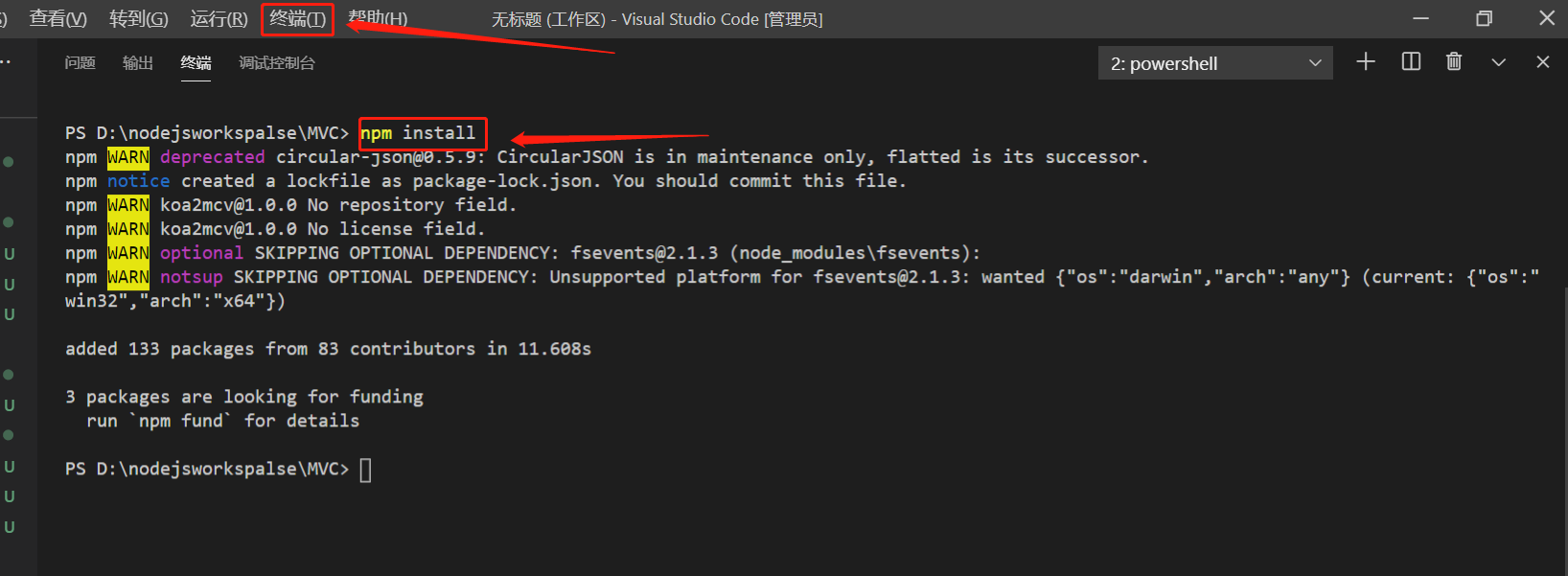
4、项目结构构建结束,接着引入所有依赖包,在终端中执行'npm install' ,会下载package.json中dependencies所有包,以及这些包所依赖的包。
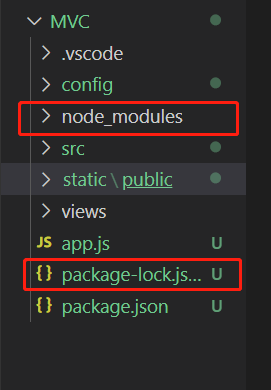
执行后项目结构会增加两个文件
5、编写测试用例,在src下新建hello.js。
//tokenconst token = require('../config/token');var fn_hello = async (ctx, next) => { var name = ctx.params.name; ctx.response.body = `<h1>Hello, ${name}!</h1>`;};var fn_index = async (ctx, next) => { ctx.response.body = `<h1>Index</h1> <form action="/koa/signin" method="post"> <p>Name: <input name="name" value=""></p> <p>Password: <input name="password" type="password"></p> <p><input type="submit" value="Submit"></p> </form>`;};var fn_signin = async (ctx, next) => { var name = ctx.request.body.name || '', password = ctx.request.body.password || ''; console.log(`登陆名: ${name}, 密码: ${password}`); ctx.response.body = `<h1>Welcome, ${name}!</h1><br/>you token:<br/>${token.createToken({user: name,password: password})}`; };module.exports = { 'GET /hello/:name': fn_hello, 'GET /login': fn_index, 'POST /dologin': fn_signin};
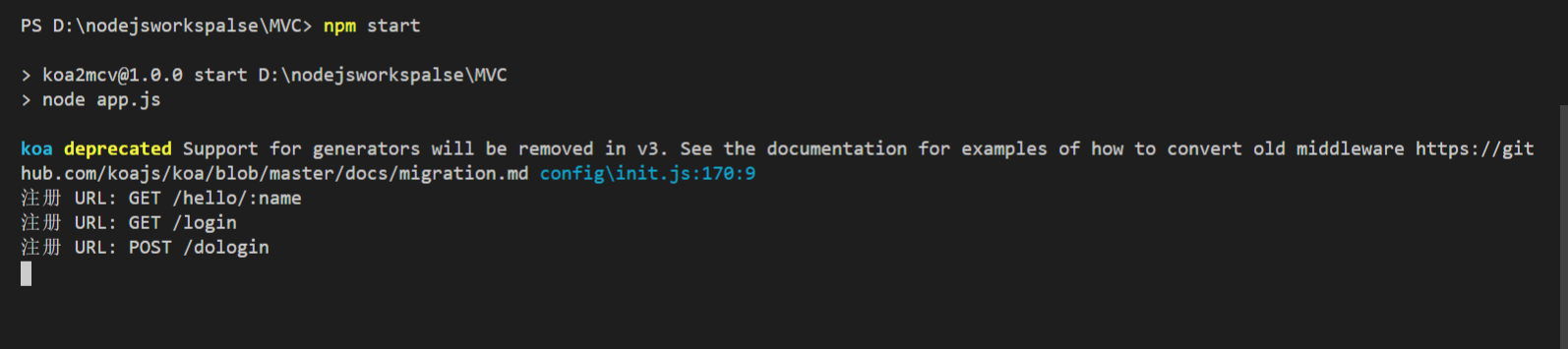
6、启动项目
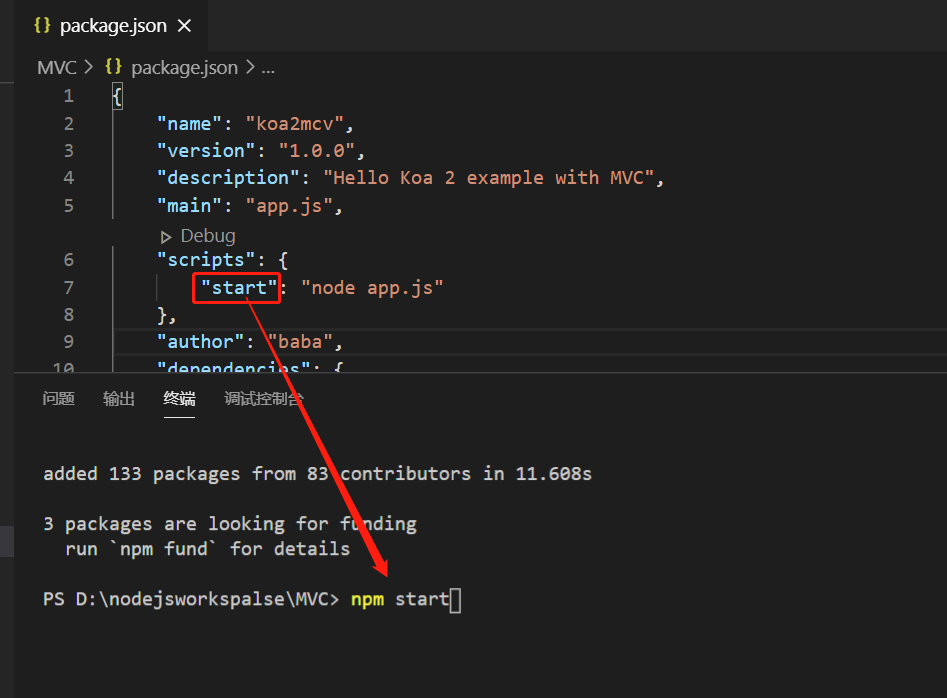
启动成功
测试访问 src="https://img2020.cnblogs.com/blog/1689043/202010/1689043-20201021114238150-1107313444.png" alt="" loading="lazy">
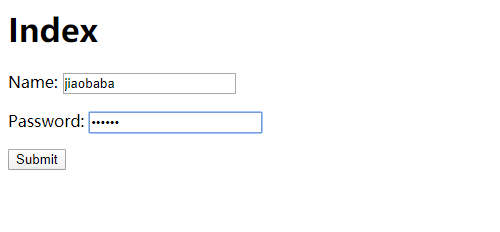
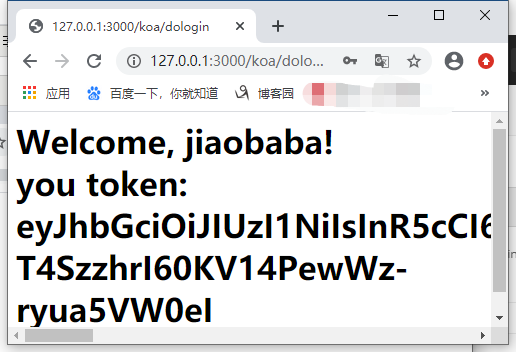
输入值获取token
先不用带token进行访问
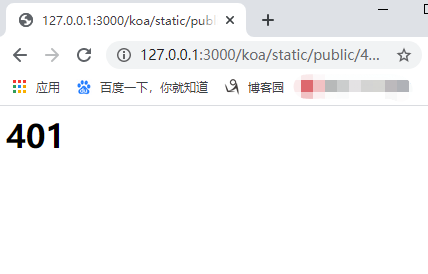
拦截成功
带上token 进行访问
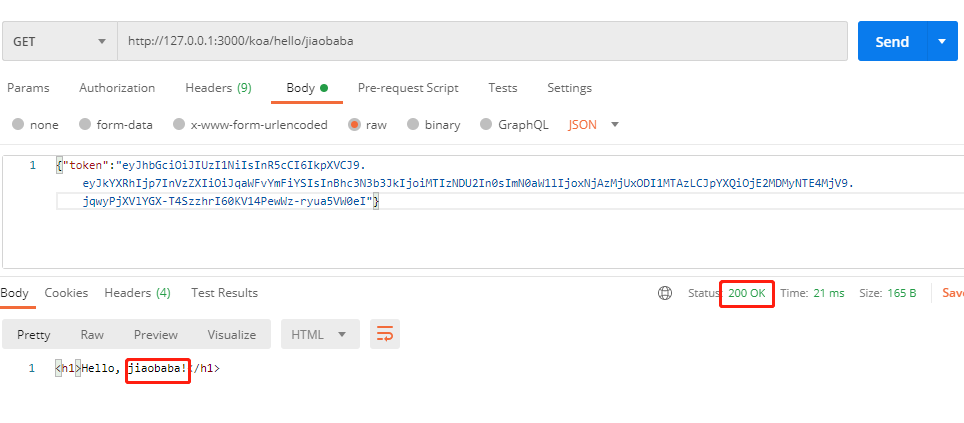
测试成功!
end
原文转载:http://www.shaoqun.com/a/481418.html
心怡:https://www.ikjzd.com/w/1327
reddit:https://www.ikjzd.com/w/180
feedly:https://www.ikjzd.com/w/754
koa2-MVC架构---------后端技术做前端环境:nodejs开发工具:VisualStudioCode(下文简称:VSC)环境安装,工具安装及中文自行百度,环境调整好后开始进入正题。1、在硬盘上新增一个文件夹,打开VSC,点击'添加工作区文件夹',如果没有欢迎'使用页面',点击--文件--新建窗口,效果如下图:2、添加vsc调试。Shift+ctrl+p,输入框内输入:launch.js
55海淘网:https://www.ikjzd.com/w/1723
acca是什么:https://www.ikjzd.com/w/1370
2018年prime day日期或为7月17日,促销时长或达36个小时!:https://www.ikjzd.com/home/2232
亚马逊第三方中国卖家地域分布数据新鲜出炉,深圳第一广州第二:https://www.ikjzd.com/home/109795
18时更新强对流预警:广东山东京津冀都有雷暴冰雹:http://tour.shaoqun.com/a/74870.html

没有评论:
发表评论